

Disclaimer

This website publishes free educational articles about desk setup and movement during computer work. It is not medical advice, does not sell medical products or treatments, and does not promise specific results. For personal health questions, consult a licensed professional in your state.

Who operates this website

Energvrstrain.ddd is an informational website based in Jackson, Mississippi, United States. We publish plain-language guides about chair height, screen position, and short movement breaks for people who work at a computer. We do not provide clinical care, sell supplements or medical devices, or charge for access to our articles.

What you get here Free articles, checklists, and event listings about desk ergonomics — no account required to read.
How we write Content is practical and educational. We avoid outcome promises and do not claim endorsements from healthcare providers.
Business contact 2025 Riverside Dr, Jackson, MS 39202 · admin@energvrstrain.world · +1 (601) 218-5525
Policies See our About page, Privacy Policy, and Terms of Use for how we handle data and content limits.

What good posture looks like when you sit

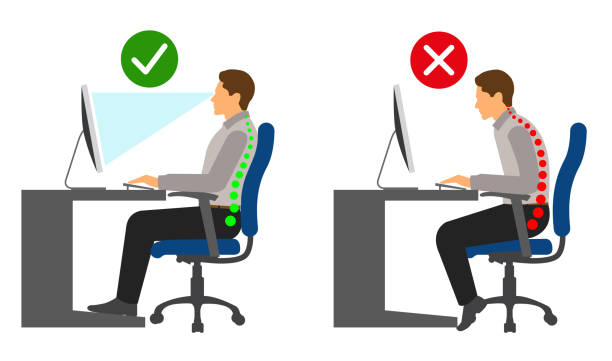
A “good” seated spine is not perfectly straight like a pole. It’s organized: natural curves stay present, while your body stops drifting into one-sided slouching or forward-head habits. If you look at yourself from the side, the ears typically sit over the shoulders, and the shoulders sit over the ribcage—not hunched in front of it.

The lumbar area (lower back) should feel supported without being aggressively arched. Imagine your ribcage stacking on top of your pelvis like two tidy blocks. When that stacking is lost, the pelvis may tip backward or forward, which then changes how your hips and lower back carry weight.

  • Ribs over pelvis: you feel your posture “centered.”
  • Upper back: supported so you don’t hold yourself up with tension.
  • Neck: long and neutral, with minimal chin thrust.
  • Breathing: you can inhale without your ribs collapsing inward.
Quick check

Sit tall, then relax your shoulders. If you can keep your head roughly above your shoulders while your arms rest comfortably on the surface, you’re closer to neutral alignment.

Get your chair, desk, and screen heights right

Many people try to “posture harder,” but the setup often makes upright sitting difficult. Use a height triangle: keyboard/mouse height, seat height, and monitor height. When one side of the triangle is off, your spine compensates—usually with rounding in the upper back or a forward neck habit.

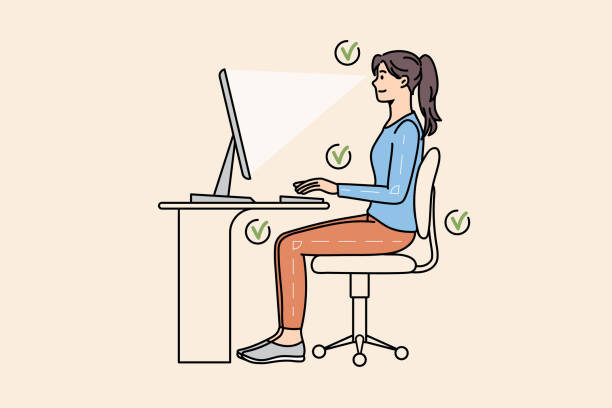
Start with feet. If your feet dangle, your hips tend to drift, and the low back has to work overtime. Adjust seat height so your feet contact the floor or a stable footrest, with knees roughly level with—or slightly below—hip height.

Next, arms. Elbows should rest near your sides with a comfortable bend, so you’re not reaching forward. Raise or lower the chair, or adjust the desk/work surface, until your shoulders stay relaxed.

  • Keyboard: close enough that wrists don’t bend up.
  • Elbows: comfortably bent; not forced outward.
  • Monitor: top third near eye level to reduce neck strain.
  • Distance: far enough to keep a gentle head position.
SeatFeet grounded, hips stable
KeyboardElbows near body, wrists neutral
MonitorEyes lead, neck follows

How to pick a chair that fits your body

A premium chair isn’t “the one that looks stylish.” It’s the one that lets you set your body in a supported, repeatable position. Look for adjustability that matches your measurements: seat height, backrest height, and backrest angle. Adjustable lumbar support can help, but only if it supports without forcing an unnatural curve.

Test the seat depth. If the seat is too deep, your thighs get compressed and your hips often slide forward, which changes how your lumbar area carries load. If it’s too shallow, you may end up sitting on your lower back. Ideally, you leave a small gap behind your knees and feel stable at the back of your hips.

Armrests should support your forearms without pulling your shoulders upward. You want a relaxed shoulder line, especially during typing. If the armrests block your natural arm movement, consider adjustable or removable ones.

Multiple adjustments for your body
Backrest that supports upper back
Seat depth compatible with thighs
Armrests that let shoulders stay down
Practical tip

Before buying, sit for 10–15 minutes and type or browse. If you feel you must constantly “correct,” the chair is fighting you.

Small movements that help on long workdays

Your spine is designed for movement. The problem with office posture is not “one bad position,” but long time spent in the same pattern. Even with a perfect chair, staying still too long encourages tissues to adapt to stiffness. Micro-movement keeps your joints lubricated and gives your nervous system frequent “reset signals.”

Use short, low-effort changes you can do without breaking focus: a gentle sit-forward and back, a shoulder roll with controlled breathing, and small neck “nods” that keep range comfortable. Aim for regularity, not intensity. Your best routine feels boring and repeatable.

  • Every 20–30 minutes: stand or change position for 20–60 seconds.
  • During calls: relax the jaw, soften shoulders, re-center the head.
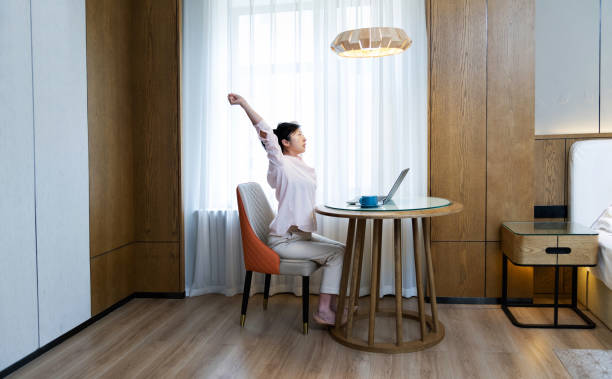
  • At breaks: reach tall, then hinge slightly at the hips to vary the spine angle.
  • For wrists: shake out hands lightly and reset forearm alignment.
60-second “reset”

Exhale fully, imagine your ribs stacking over your pelvis, and take 3 slow breaths while keeping your head above your shoulders. Then release the shoulders and return to the task.

How breathing affects your posture

Many people brace without realizing it. When you breathe shallowly, your ribcage often stays collapsed, which can increase tension around the upper back and neck. Posture and breathing are connected because the ribcage’s movement changes how your spine feels.

Try a simple breath cue: sit with feet grounded, then inhale so your ribs expand gently to the sides and back, not just forward. On the exhale, keep your head lifted and let your shoulders drop slightly rather than pulling them back aggressively.

This doesn’t mean “perfect posture forever.” It means you can create a reliable, comfortable alignment moment that your body remembers during the workday. When you practice these breaths, your spine becomes more responsive to tiny corrections.

Inhale: ribs expand gently
Exhale: soften shoulders
Maintain head-over-shoulders
Comfort over strain
What to notice

If you feel you’re “holding your posture” with neck tension, reduce the effort and try again. Your spine should feel organized, not gripped.

Keyboard, mouse, and reach — not just height

If your keyboard and mouse are too far, you end up leaning forward and turning your spine into a brace. That reach pattern often shows up as upper-back rounding and a forward neck habit. Instead of compensating with effort, reduce the distance your body has to travel.

Keep the work zone within a comfortable arm arc. When you reach for frequently used items, bring them closer rather than twisting your torso. Consider a keyboard tray or a smaller desk surface arrangement so your elbows stay close.

Mouse height matters for forearms and shoulders. If the mouse is too low, your shoulder lifts and your wrist may bend. If the mouse is too high, your elbow floats outward. Aim for a position where your forearm feels supported and wrists stay neutral.

  • Place the monitor so your eyes lead; turn your body instead of craning your neck.
  • Use a wrist rest only when it helps you stay relaxed (avoid pushing weight onto wrists).
  • Switch hands briefly or alternate tasks to distribute effort.
  • Keep cables and chargers off the floor so you don’t move awkwardly around them.
Tiny reach swap

Move the mouse 5–10 cm closer and watch how your shoulders settle. Small changes often create bigger relief.

Build simple habits you can stick with

The goal is repeatability. Your posture won’t stay “perfect” if it relies on willpower alone. Build a habit loop using triggers you already have: starting work, opening the meeting calendar, sending messages, and closing the day.

For example: at the start of your work session, do a 3-breath stack (feet grounded, ribs gently expanding, exhale with relaxed shoulders). For your next 30 minutes, stay focused but allow the body to breathe normally. When you notice tension, you don’t “fix” posture by forcing a curve—just re-stack and continue.

Over time, your nervous system learns what organized sitting feels like. That’s how you reduce the need for constant corrections. Pair posture checks with microbreaks so your body doesn’t get stuck in one angle.

TriggerStart work / open laptop
Action3 slow breaths + shoulder drop
RewardEasier focus with a relaxed neck
Track one metric

Choose one: “I can look at the screen without neck strain,” or “I stand up at least twice per hour.” One metric is easier than trying to track everything.

Workstation safety tips for your workday

Think of office ergonomics like a protective routine. It doesn’t require extreme exercises. It requires smart pacing: comfort during work, and planned movement when you can.

  • Use a timer to prevent “silent overuse.”
  • Keep posture changes small and frequent rather than rare and dramatic.
  • Adjust screen height and distance so you’re not searching with your neck.
  • Stay within a comfortable range of motion; stop any movement that feels sharp or unusual.
  • Alternate tasks that use different muscle groups (typing vs. reading vs. phone calls).

If something feels off for more than a short time, pause, adjust your setup, and consider speaking with a licensed professional. This site offers practical education only — not diagnosis or treatment.

Want a full checklist?

See our setup guide for step-by-step checks you can use every workday.

Set up your desk in one evening

You don’t need to overhaul everything at once. Use a staged approach: fix the foundation first (feet, seat height, monitor height), then refine the work zone (keyboard/mouse reach), and finally add movement structure (microbreaks and short exercise blocks).

If you only have one hour, this order tends to work: start by planting your feet, set seat height so your knees match hip level, and bring the screen so your eyes lead naturally. After that, move the keyboard closer and set arm support so shoulders remain down.

  • Foundation (10–15 min): feet grounded + hips stable.
  • Screen (10–15 min): eyes to the top third of the display.
  • Hands (15–20 min): elbows near body, wrists neutral.
  • Movement (10 min): choose 2 micro-exercises you can repeat daily.
Keep it realistic

Choose a setup you will actually use tomorrow. If something feels complicated, simplify until it becomes your default.

Ready? Go to Stretches to pick a routine you can start today.